What is freshdesk?

Freshdesk is a cloud-based customer service software that helps businesses provide effortless service across every customer touchpoint. Freshdesk empowers businesses to monitor customer conversations across email, phone, chat, social media and instant messaging, improve agent productivity with smart automations, deliver self-service experiences with AI-chatbots and branded help centers, and monitor key performance metrics with powerful analytics.
Freshdesk Pricing
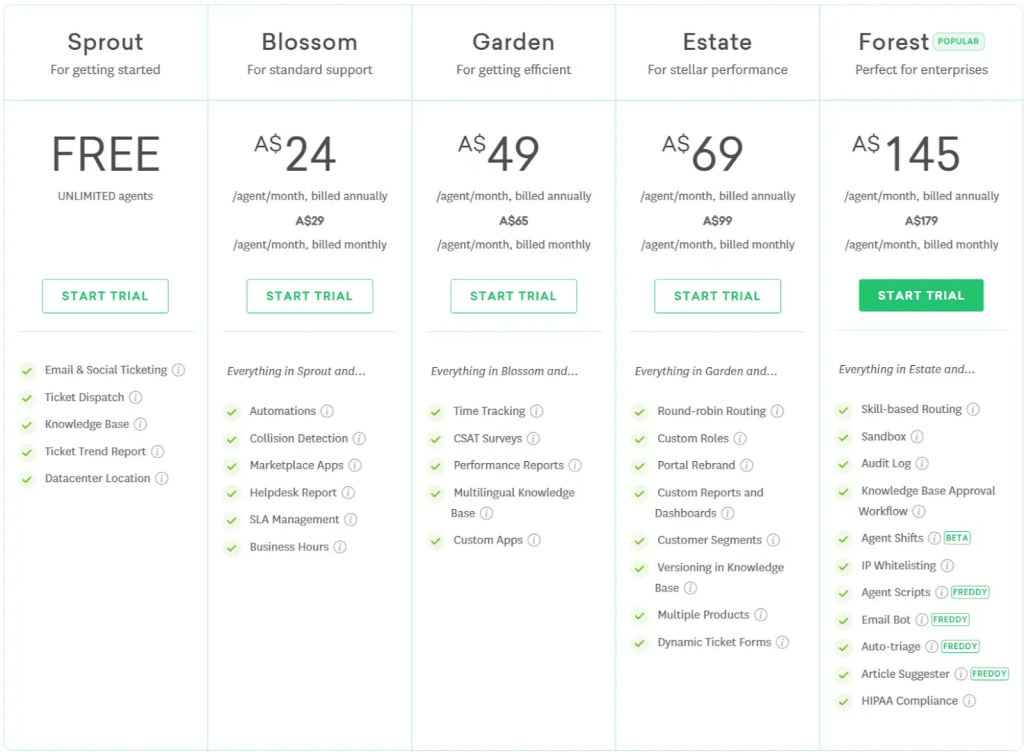
Freshdesk is priced per support agent per month, and has 4 different plans. Free- $0 (unlimited free agents) Growth- $18/agent/month billed monthly or $15/agent/month billed yearly Pro- $47/agent/month billed monthly or $39/agent/month billed yearly Enterprice- $83/agent/month billed monthly or $69/agent/month billed yearly
Starting price:
$15.00 per month
Free trial:
Available
Free version:
Available
Pros and Cons
“This is a great platform for helpdesk management. We use it for around 5 engineers and it works great as it’s not over-complicated.”
“Wonderful tracking and organization of emails and support issues, with a nice and clean UI, and simple tools to automate many support tasks.”
“Applications/Addons are great for customizing. Integrations with other products are fantastic.”
“Contact management and search is awful. It is really difficult to avoid creating duplicated clients with slightly different name.”
“The support and contact system for Freshworks/Freshdesk is as bad as it gets.”
“The only negative thing so far, is that some Spanish translations have been erroneous or inaccurate.”
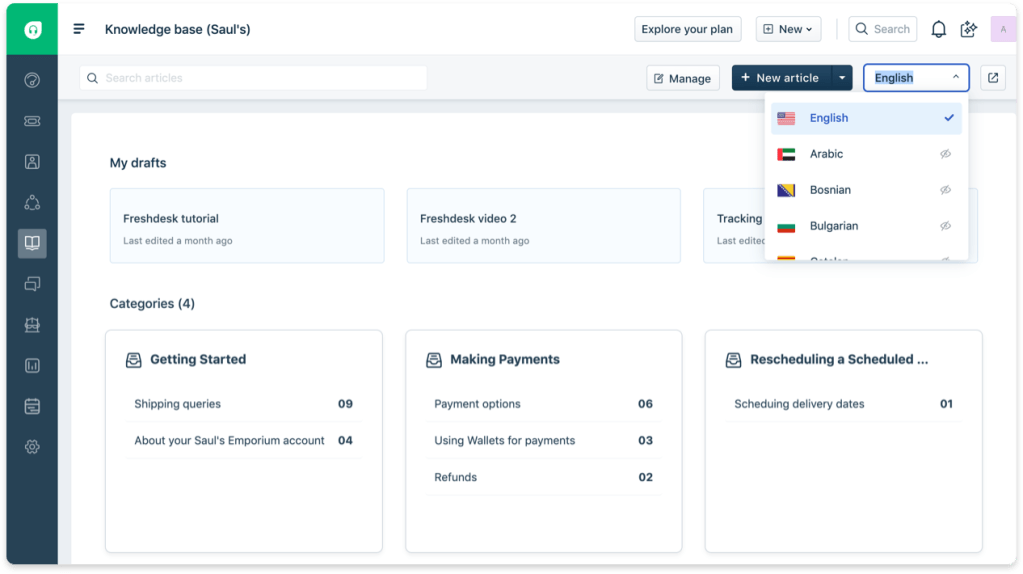
FRESHDESK: KEY FEATURES
Freshdesk is split into three modules: Support Center, Messaging, and Contact Center.
The Support Center module handles customer support tickets. You can set up ticketing across multiple platforms, including your website, an app, social media, and more. New tickets can go not only to an individual but also to shared inboxes to enable collaboration. Teams can share tickets with other teams, as well as split up tasks to speed up answering complex requests.
More advanced features include “Agent Collision Detection”, which prevents multiple agents from unknowingly working on the same ticket. Freshdesk also supports SLA Management, so you can set deadlines for ticket response and/or resolution. This is made easier by the “Ticket Field Suggester” which can automatically categorize tickets and make sensible suggestions for filling fields.
We were also impressed to see that Freshdesk has a built-in “Thank You
Detector”. This prevents tickets from being reopened if a customer responds with a thank you.
Messaging, formerly known as Freshchat, is Freshdesk’s chatbot service. You can deploy automated chatbots across your website, mobile app, Facebook Messenger, WhatsApp, Telegram, and Apple Messages. As for support tickets, incoming messages can be directed to a shared inbox to promote collaboration within support teams. Tickets can also be automatically assigned to agents based on certain keywords and/or priorities.
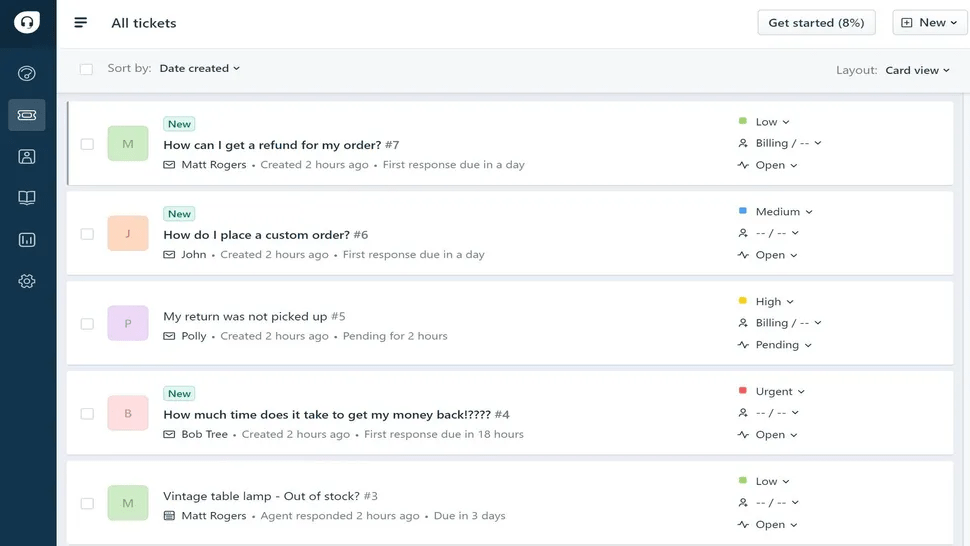
Freshdesk offers built-in reports and analysis tools to help you constantly improve the quality of your customer service. We thought the platform did a great job with its pre-made reports, which offer customizable charts for support ticket load, agent and team productivity, and customer satisfaction surveys. You can filter these reports by agent, team, or support type, and it’s simple to export them to a PDF.
If you want more detailed analytics, Freshdesk gets a lot more complicated quickly. The platform’s custom report builder lets you drag and drop analysis widgets onto a page to create your own dashboards. There are some templates to get you started, but for the most part, you’ll add blank charts and tables, and then select what data to display. You can also add images and text boxes, customize the fonts and colors for each graph, and more.
The flexibility this offers is hard to beat, especially if you want to create a professional-looking report for a big meeting. However, the learning curve is quite steep when building your first few reports, and it takes a lot of time to work through all the customization options.
FRESHDESK: SECURITY
The good people of Freshworks seem to take security very seriously. The company claims that its servers are hosted in “world-class data centers that are protected by biometric locks and 24-hour surveillance”.
All Freshdesk accounts come with an SSL certificate, which is enabled by default. Customers are free to set up their own support domain or vanity URL. You can also set up your own custom SSL URL – Freshworks claim they can get this feature up and running in 72 hours.
If you want to add multiple portals to your Freshdesk account, these can also use SSL authentication, though it’s not clear from Freshwork’s Security page if this means your account can support multiple SSL certificates.
You can lock down your account still further by setting up whitelists to only allow connections from known office network addresses for your agents. The whitelist can also be connected to a VPN to allow co-workers to dial in remotely if necessary.
Freshdesk also supports simple logins via SSO (Single Sign On), so employees can use your existing Active Directory or online accounts like Google to authenticate themselves.
It’s also fairly easy to make your data HIPPA or GDPR-compliant. Freshdesk supports creating multiple encrypted fields in forms for storing personal data. It’s also very simple to export or delete customer data in response to data protection requests.
Freshworks also claim that all customer data is encrypted when at rest and that they use SHA-256 encoding (presumably for storing sensitive data like passwords and credit card numbers).
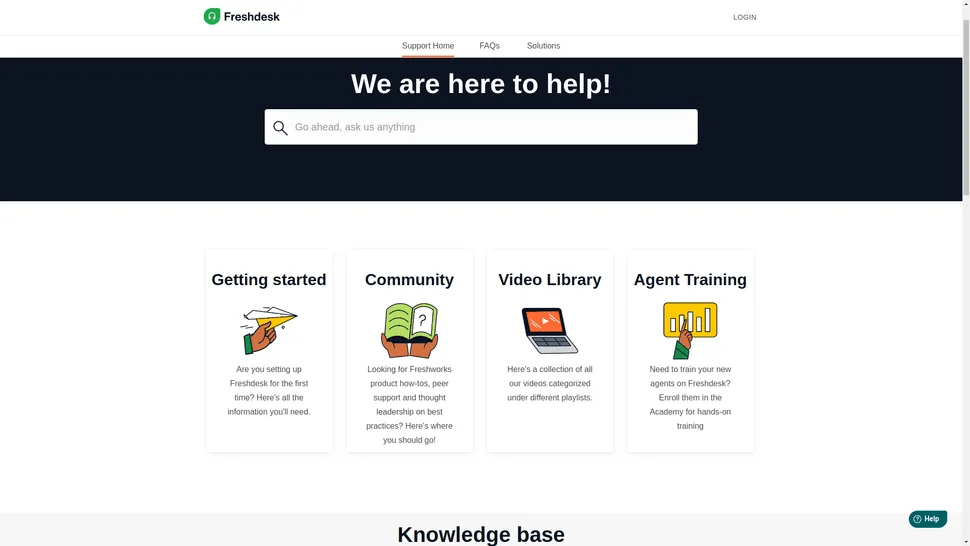
FRESHDESK: SUPPORT
Freshdesk support pages are well-laid out and contain all the sections you’d expect for navigating such a complex platform. We were particularly delighted to see a “Getting Started” section which includes common topics like setting up support channels and getting to grips with the Admin section.
The ‘Community’ section allows Freshdesk users to share “how tos” and “best practices”. There are contributions from Freshworks staff too, such as regular posts about new features.
The small video library also has some excellent instructions on how to perform basic tasks like convert Gmail messages to support tickets. Freshworks even has a dedicated academy where Agents can train how to use the platform and earn certification.
If customers run into further difficulties, the website does post an e-mail address and contact number. Subscribers can use these to contact Freshdesk support at any time.
ALTERNATIVES TO FRESHDESK
Freshdesk isn’t the only CRM focused on helping you offer exceptional customer support. Zendesk and LiveAgent are two competing software platforms that give you tools for ticketing, live chat, and phone support.
We found Zendesk to be extremely versatile. It offers more than 1,000 apps and integrations, and includes automation features at a cheaper price point than Freshdesk. Plus, it has an internal help desk, which is a great tool for larger companies.
The downside to Zendesk is that it’s not as user-friendly as Freshdesk. For small companies that want to get a support center up and running quickly, that could be an important reason to choose the latter.
LiveAgent is more affordable than Freshdesk, but we found that this platform doesn’t offer nearly the same depth of features. Ticketing takes a backseat to live chat support within the platform, which means that there are fewer reporting options and automations for ticketing. It also doesn’t offer phone support at all.
So, LiveAgent can be a good option if you primarily want to set up chat support, but it’s not as powerful as Freshdesk for creating a complete support center.
 TECH ADVICE
Leave a comment