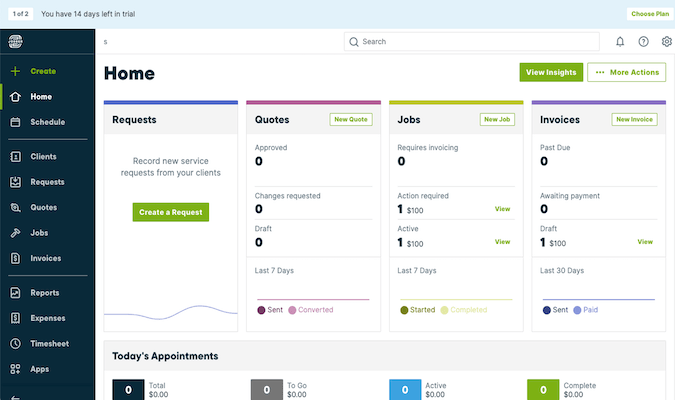
Jobber is a cloud-based field service management software solution that allows small and midsize service businesses to manage field staff, provide customer support, and expand business operations either through a mobile app or a desktop dashboard. As a service business solution, Jobber supports over 50+ service industries and provides interchangeable tools such as an integrated CRM, real-time scheduling and dispatching, expense tracking, invoice creation and billing, online booking, a self-service client hub, quoting, client reminders, automatic emails and many more. With time tracking functionality, Jobber’s scheduling module allows users to update any job in real-time such information on task completed and project progress so management can effectively track field personnel. For assignments, management teams can set up individual jobs or recurring contracts and assign multiple field technicians to a single job. Jobber allows users to create professional invoices using customizable templates and will automatically send invoices via email. For epayments, Jobber partners with various electronic payment apps, such as Stripe and Paypal to streamline electronic billing.
Pricing
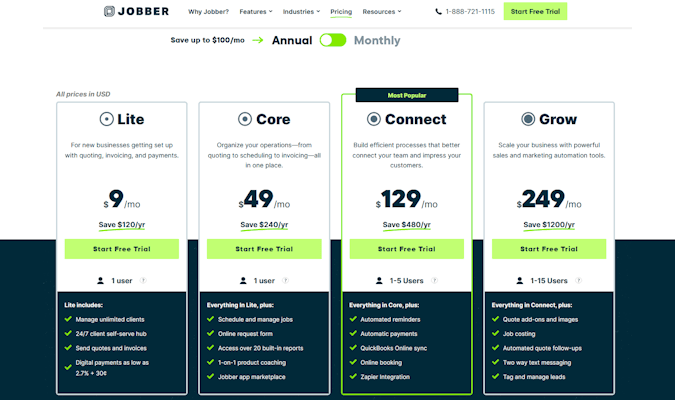
Jobber offers 4 plans with different available features and numbers of users per plan. Jobber Lite starts at $19/month. Jobber Core starts at just $69/month. Jobber Connect starts at $169/month. Jobber Grow starts at $349/month.
Starting price:
$19.00 per month
Free trial:
Available
Free version:
Not Available
Pros and Cons
“Jobber does the job nicely, quickly, easily and is quite affordable for any small business. It integrates nicely with financial systems such as QuickBooks too.”
“Jobber streamlines the whole process of dispatching, time tracking, and invoicing and exports the info to my QuickBooks. Excellent customer support as well.”
“Functionality, ease of use, very short learning curb and quickly integrated with my business.”
“Technicians can’t even look at the calendar to see where their next job is. This has been a very disappointing and huge inconvenience.”
“I really don’t have any major negative complaints on this program, once I learned the set up and got used to it.”
“And if there was you guys would fix it before I could complain. We use Jobber every single day and we would be lost with out it.”
Jobber’s Potential Drawbacks
For all it can do, there are some limitations to Jobber’s features. By and large, this takes the form of essential tools being locked away on high-priced plans, but there are other aspects of the software that just flat-out disappoint some users.
Booking and scheduling
True to its mission, Jobber can make your customer service better through convenient job booking and scheduling features.
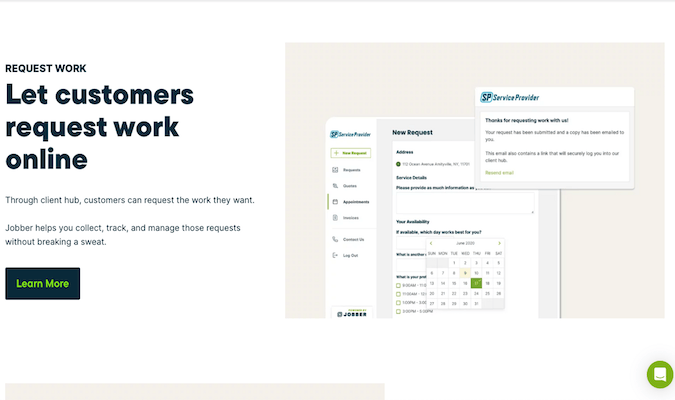
Customers can conveniently book appointments on your website at any time of day, and Jobber lets you set up service availability parameters so they can accurately self-schedule appointments. Customers only see services, times, and dates that you make bookable.
Place this booking form on your website, social media, client portal, or anywhere prospects may find it to more effectively generate new work. Within it, you can describe the services you offer in detail, including estimated or average duration and itemized pricing.
The booking widget updates your team’s availability in real time so that Jobber can automatically place customer bookings on your calendar without messing up your existing schedule or requiring manual corrections.
Payment option constraints
We’ve already briefly mentioned one of these limitations—you’re only able to set up automated payments on select Jobber plans.
That can create several issues for users on lower-cost plans, chief among them the inability to set up recurring payments for customers getting routine service or maintenance from your team.
But the bigger issue isn’t one of a feature being locked away on the most expensive plans.
Partial payments are a pain in Jobber, plain and simple. Customers don’t have an option in their portal to opt for a payment any less than the full total due. Jobber does offer consumer financing on quotes with Wisetack. This allows the service provider to get paid in full, while the customers can select financing options directly in the quote.
Or, the service provider can split payments as a deposit on a quote, with the remainder on the invoice.
You can accept partial payments in the Jobber platform, but it requires you to enter a custom dollar amount in the software’s section for collecting payments. That can only work if a customer’s credit card is on file or you manually enter a cash payment made in person.
Regardless, if you manually enter partial payments, you’re also on the hook for communicating with the customer about their updated balance, due dates for the rest of the owed amount, and keeping a paper trail in case they skip out on the rest of the bill.
The manual requirements for handling partial payments can cause a lot of confusion and inconvenience, potentially leading to dissatisfied customers, even if you knocked the actual on-site work out of the park.
Final Thoughts
Jobber is a potent solution for field service businesses looking to improve their overall management of work, scheduling, and clients. With a bevy of features that make life more convenient for your team and your customers, it’s a solid option as long as your company can stomach the price tag for accessing its advanced features.
 TECH ADVICE
Leave a comment